Search This Blog

Thursday, October 30, 2014

How to Forcefully umount filesystem

fuser -km

-k =
Kill processes accessing the file.
-m =
Name specifies a file on a mounted file system or a block device that is mounted. In above example you are using


Thursday, July 24, 2014

Ubuntu Virtualbox Shared folder Mount Issue

While mounting a shared folder on Virtual box you may encounter an error saying 
Mount wrong fs type bad option.

Don't panic 

Just run below script

sudo ln -s /opt/VBoxGuestAdditions-4.3.10/lib/VBoxGuestAdditions \
/usr/lib/VBoxGuestAdditions

Sunday, June 15, 2014

sysctl linux command.

Its more likely you are not aware of this command until you install Oracle DB ;)

Lets look at how to use it .
You may encounter a warning asking you change the kernel parameter. At this point of time you start searching for how to change kernel parameter . 

sysctl is an answer to your query lets stop talking and fire some command. 
(Note : Kernel parameters are not toys to play with so be very careful while dealing with them)

First you need to see the current value of kernel parameter 
You can simple run below command to check the value.
sysctl -a |grep (parameter-name)
e.g
# sysctl -a |grep pid_max
kernel.pid_max = 32768

Once you identify the value its time to change it  .
There are two ways of doing it 
1) temporary ( parameter will only be changed as long as you don't reboot the host)
2) permanent  ( parameter will stay even after reboot)

1) temporary ( parameter will only be changed as long as you don't reboot the host)
Step 1:
Login using root
Step 2:
sysctl -w (parameter-name)=(value)

2) permanent  ( parameter will stay even after reboot)
Step 1:
Login using root
Step 2:
take a backup of /etc/sysctl.conf
#cp /etc/sysctl.conf /etc/sysctl.conf.bkp.16jun2014
Step 3: 
now check if the parameter you want to change is in the file or not 
#cat /etc/sysctl.conf |grep (parameter-name)
If it exists then change it or else add an entry at the bottom of the file.(using text editors like vi )
Step 4:
once you edit the file fire below command so that parameters will be reinitialized. 
#sysctl -p


Thursday, March 13, 2014

OVM 3 not able to detect local disk.

Sometime it is possible that You may not able create local repositories as Local disks are not shown in OVM manager .
This is possible mainly due to following reasons
 i) Server Pool in non clustered mode.
 ii) Multipathing is disabled on server.(I know it sound little stupid but that's how its build. )

 #service multipathd status
 # to start the service
 #service multipathd start  
 #moreover allow the service to start after system reboot
 #chkconfig multipathd on  
 
For more information please refer below link.
https://community.oracle.com/thread/2369991

Thursday, January 23, 2014

How to check mounted luns ?

Install FC PCI card on server.


To check the FC PCI card port details on Server. use below commnd.

#ls /sys/class/fc_host
 host8  host9
(In above case host8 and host9 are adapters )

# cat /sys/class/fc_host/host8/port_name
0x2100001b328a5ec4

# cat /sys/class/fc_host/host9/port_name
0x2101001b32aa5ec4

 (In above example we have 2 port on server.. With wwnn number as described in output)
You can also get above information using command below
#systool -c fc_host -A port_name


------------------------------------------------------------------------
 Before scanning the fc lun  . 
Check the number of disks
# fdisk -l 2>/dev/null | egrep '^Disk' | egrep -v 'dm-' | wc -l
5

(In above case i have  5 disks before running the scan)
 

# echo "1" > /sys/class/fc_host/host8/issue_lip
# echo "1" > /sys/class/fc_host/host9/issue_lip


(Check /var/log/messages .. Sometime it may take time as its asynchronous process )
After scanning the fc lun.
Check the number of disks.
# fdisk -l 2>/dev/null | egrep '^Disk' | egrep -v 'dm-' | wc -l
9

(Earlier it was 5 .. We have added only one lun however due to fc adaptor's 4 port its showing 4.. We need to enable multi pathing here)
You can also ensure the above by counting the number of disks.
#fdisk -l |egrep '^Disk' |egrep -v 'dm-' ( some disks excluded to include new disk details)
In addition to existing disks i can see below 4 disks
Disk /dev/sdf: 1099.5 GB, 1099511627776 bytes
Disk /dev/sdg: 1099.5 GB, 1099511627776 bytes
Disk /dev/sdh: 1099.5 GB, 1099511627776 bytes
Disk /dev/sdi: 1099.5 GB, 1099511627776 bytes

All the lun details are stored in below path.
/dev/disk/by-path

Here comes the pain understanding the output :)

Oracle VM 3 How to find the VM Server version.

Yes that old /etc/issue file will help you find the Server version details in below format.

#cat /etc/issue
Oracle VM server release 3.2.2
Hypervisor running in 64 bit mode with Hardware Virtualization support.

Network :
IF : bond0      MAC :  IP :
IF : eth0       MAC :
IF : eth1       MAC :
IF : eth2       MAC :
IF : eth3       MAC :
IF : eth4       MAC :
IF : eth5       MAC :
IF : eth6       MAC :
IF : eth7       MAC :

CPU :
cpu family      :
model           :
model name      :

Thursday, January 24, 2013

Tar gzip simplified.

I m a great fan of thegeekstuff.com .Recently come across their article over Tar and Gzip commands.

I must say This guy Ramesh Doing Great stuff by simplifying the complex Linux commands.

Take a look at the article Here.

http://www.thegeekstuff.com/2010/04/unix-tar-command-examples/

Its always a best practice to include date in tar file name .
tar cvf Directoryname-$(date +%Y%m%d).tar  Directorypath

Tuesday, August 7, 2012

Understanding rc file.

Name:
rc

Location:

/etc/rc.d/rc

Purpose:

This file is responsible for starting/stopping services when the run level changes.

Who initiate the script

Init initiates the script whenever a change in run level happen using init command.

Monday, July 16, 2012

Linux Boot Process for Beginners.

There are various articles available on internet explaining boot process.This is yet another attempt to reinvent the wheel but this time I m taking in consideration newbies, who just started loving Linux.


Most of the Articles on Linux Boot Process begins with the Power On stage ,I will change the trend by Beginning with Linux Installation.

Linux Installer (Anaconda) takes care of the Linux installation process.During the installation process It places a tiny file in the Beginning of the Harddisk.
(To be very specific Cylinder 0,Head 0 ,Sector 1 of the harddisk .You dont need to remember all this as you just started learning Linux but Little bit of extra details makes no Harm).

So Anaconda places a tiny file at a start of the Harddisk.

Now the question is why does he do that ?

Ans : As you go ahead you will understand the reason why.

What is the name of the file ?

Ans : In older Linux Distributions There was a file called LILO .but in modern Distributions of Linux the file is replaced by another file called GRUB.
Moral of the story : GRUB is Latest ,LILO is Old.

What does this file contains ?

This file contains reference to other files.

Why does it Contains the reference ?

Now this is interesting.

Thursday, June 21, 2012

Mumbai Mantralaya Burning.

I was passing by a street and suddenly heard people telling mantralaya is on burn.

I checked the news and its was indeed burning....
May god help whoever trapped inside.


Lets talk some technology here.

Some guy updated his facebook saying "Mantralaya on burn i can see it". I m amazed by the speed such news spreads.Facebook and twitter are faster than So called news channels.

As this blog is sponsored by google you can view it on first page of google.

There are people who use such events to advertise .I know its sad but its another way to advertise.Be it India win the wordcup or  sad demise of a President .
At the end of the day Its all about advertising .


Tuesday, June 12, 2012

Disk ,Cylinders and Sectors

Disk is composed of cylinders.

Each cylinder is composed of disk sectors.Different Drives have different number of sector sizes.
For example
if a hard disk of Samsung has 2000 cylinder each of which consist of 16000 sectors .
Each sector size is 512 byte.
There fore the size of one cylinder is
16000 * 512 byte =16000 * 1/2 kb (as 512byte is a half kilobyte)= 8000 k = 8 Mb (approx).
There for the size of hard disk is 8 Mb* 2000 =16000 Mb = 16 Gb.

The more the size of cylinder the more the disk performance.For example Samsung disk with one cylinder size 8 Mb will give better performance than Western Digital of 4mb per cylinder size.

Interesting facts about Linux.

1) Swap is better pronounced as swop.The word has its origins in french.

2) Linux will only be installed to primary master.

3) Name of linux installer is called anaconda and
For Linux installation using GUI,the partitioning tool used is Druid.
Never ever use Druid to partition using Druid as it has problem of jumping the partition number.Better use Ctr+Alt+F2 when it ask for partitioning .It will switch to command mode then use fdisk command to partition the disk.Once you finish the partition use Ctr+Alt+F7 to come back to GUI installation.

4) There are no installation types they are better called as installation classes.

Installation classes are mainly catagorised in 4 parts.
1) Personal Desktop
2) Workstation
3) Server
4) Custom

The first and second class will not format the partition and will boot in GUI.
However the third class Server class will format the partitions and will boot in command line.


Monday, June 4, 2012

OSI layer simplified.

I always had problem remembering OSI layers so i just googled hoping i get something.

Whoolaaa , I got it

"Please do not throw sausage pizza away"
Away - Application
pizza - Presentation
sausage - Session
throw - Transport
not - Network
do - Data link layer
please - Physical.


All credit goes to original inventor .

Thursday, May 24, 2012

Netstat linux command

netstat command is used to obtain network related information.

Such as
Routing table
Port information
Network interface information

let us explore netstat one by one.

1) How to display Routing table in linux?
2) How to find the port of particular application?
3) How Find out number of Machines (IP address) connected to Linux Server?

1) How to display Routing table in linux.

You can use netstat command to display routing table in linux.

#netstat -r

Tuesday, May 15, 2012

ls command delays in displaying output


Step 1:
We face issues and we tend to find an answer.
Step 2:
We get the answer and we resolve the issue.
Step 3:(Optional and always ignored)
I think its a time to document it . You will find all such instances under Problem and Answer section.


Back in october 2011 i faced a strange issue while listing the files.

I fire my favorite command to display the files/folders


#ls -ltr

to my surprise my system hanged for some time and there was significant delay in showing the output(Delay of 3 minute 2 sec. )

#time ls -ltr 
real 3m2.443s
user 0m0.003s 
sys 0m0.002s

I checked the load on system but it was within the accepted level .

Later i just issued ls command without -l option and everything looked ok.

#time ls 
real 0m0.004s
user 0m0.000s
sys 0m0.002s

This was something i never encountered before so i raised queries regarding the same on almost all linux forum.
http://www.linuxforums.org/forum/newbie/180596-execution-delay-listing-files.html#post851886

Some of the answers were really worth mentioning here.
1) the aliased "ls" command may be at fault.
Try running the command "/bin/ls -ltr" and see how that works.

2)Well the t flag sorts by modification time and then the r flag reverses the order, so maybe if there are a lot of files in that directory the sort is taking time, try running the following to identify which flag is slowing it down time ls
time ls -l 
time ls -t 
time ls -r

Answer:

The actual problem was of incorrect ownership of one of the folder. When i tried executing ls -n it resulted in faster responce . -n option make sure that only uid and gid are displayed. I figured out that one of the folder had wrong ownership. I changed the ownership of the folder and the problem was solved.
 

Tuesday, April 17, 2012

LVM from scatch


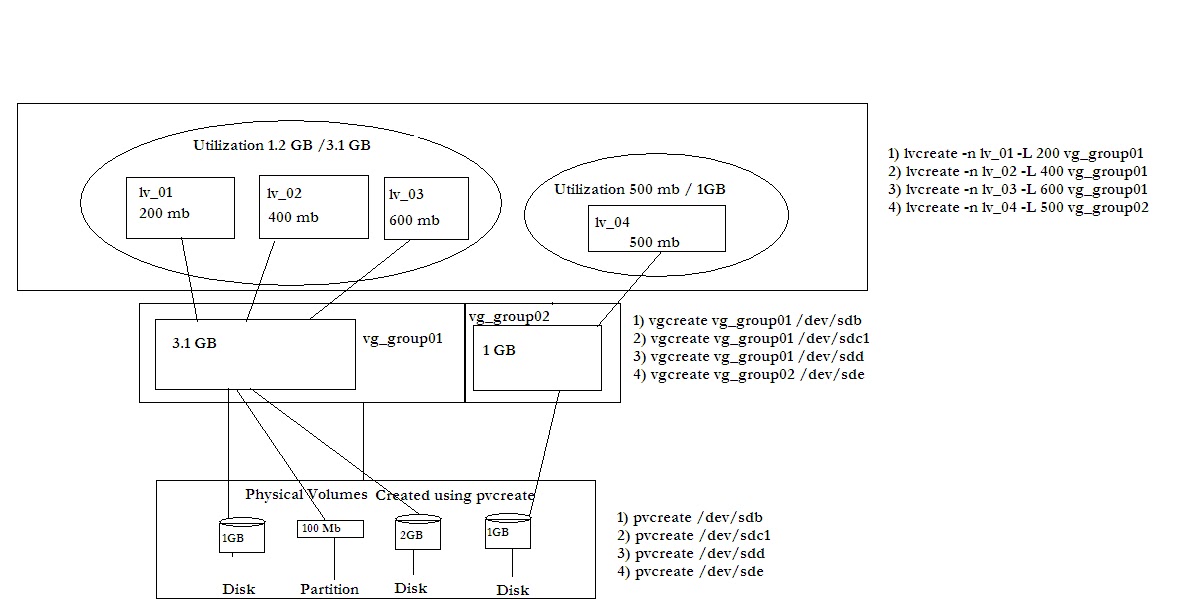
Click on below image for zoom.
 
You can see three main layers in LVM.
1) Physical volume.
2) Volume group.
3) Logical volume.

 1) Physical Volume:
This is the first level in LVM . Here you create physical volume out of actual physical disk/partition.
command used to create a Physical volume is as below.

e.g.
#pvcreate  /dev/sdb

2) Volume group:
This is the second level and assumes that you have already created physical volumes.At this stage you create group of physical volume and name them.


e.g
#vgcreate /dev/sdb vg_group01

3) Logical volume:
This is the last step in LVM creation .Here you specify the Logical volume name , size and volume group name.
e.g.
#lvcreate -n lv_01 -L 200 

Note:-
If you dont specify a unit, megabyte will be used as default.
You can also specify the logical volume size in terms of Logical extents .
To specify volume size in terms of Logical extents you use -l option. 
Specifying a name using -n option is optional .If you dont specify any name for Logical volume ,LVM2 automatically assigns it for you. 
Incase you want to change the name of Logical volume you can do it using 
lvrename oldname newname .


Monday, April 9, 2012

How to install new Kernel?

In this article we are going to upgrade the kernel version.

The main question here is  
"Why do i need to upgrade the kernel?"
Support for new Hardware
Addition of cool features.
Improving the performance
These are few reasons to upgrade the kernel. By reading the change log , you can find the features that are added to new kernel.

I m using Redhat 6 with following kernel.
# uname -r
2.6.32-71.el6.i686

To upgrade the kernel you should download it from Kernel.org.

At the time of writing this article the latest stable version is 3.3.1 .
So i downloaded it (apprx 75 mb).

Disk Partitions ( Primary , Extended and Logical partitions)

To a beginner its always a puzzle to deal with disk partitions.
Most of the guys end up giving total control to Default partition provided in Installation process and don't involve in custom partitioning.

I found most of guys asking below Questions

1) Difference between primary and extended partitions.
2) How many primary partitions can be created on a disk?
3) How many partitions can I create?

More of such questions will be addressed in this article.

If you want to use your harddisk the first thing you do is to partition it.

All OS installation processes involve this task.Each OS offers you with two major choices
either you want to go with default partitioning or specify a custom one .

Most of the time you don't want to bother about what kind of partitioning is used so you leave it default.
But if you are a system administrator and very serious about your profession you may give lot of details to partitioning.


Thursday, March 15, 2012

What is virtual applience?

To cut it in short its a stripped down version of Operating system designed to perform specific jobs.

To get more details please refer.
http://download3.vmware.com/media/vam/vam_demo.html