Click on below image for zoom.
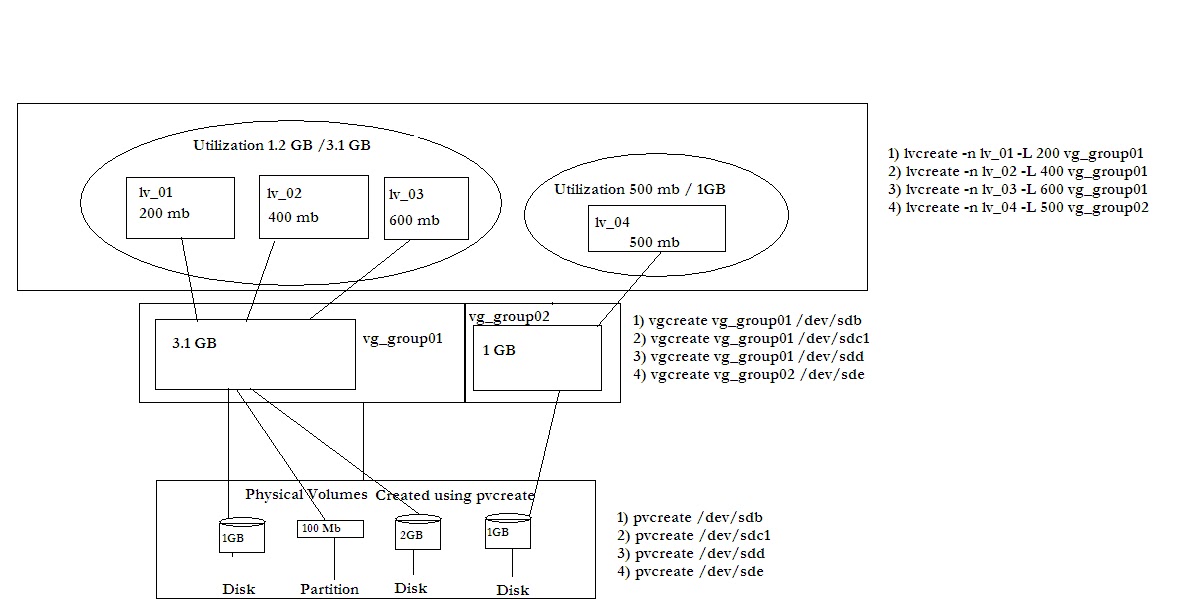
You can see three main layers in LVM.
1) Physical volume.
2) Volume group.
3) Logical volume.
1) Physical Volume:
This is the first level in LVM . Here you create physical volume out of actual physical disk/partition.
command used to create a Physical volume is as below.
e.g.
#pvcreate /dev/sdb
2) Volume group:
This is the second level and assumes that you have already created physical volumes.At this stage you create group of physical volume and name them.
e.g
#vgcreate /dev/sdb vg_group01
3) Logical volume:
This is the last step in LVM creation .Here you specify the Logical volume name , size and volume group name.
e.g.
#lvcreate -n lv_01 -L 200
Note:-
If you dont specify a unit, megabyte will be used as default.
You can also specify the logical volume size in terms of Logical extents .
To specify volume size in terms of Logical extents you use -l option.
Specifying a name using -n option is optional .If you dont specify any name for Logical volume ,LVM2 automatically assigns it for you.
Incase you want to change the name of Logical volume you can do it using
lvrename oldname newname .
